Showing posts with label Computer Tips. Show all posts

How to Easily Compress Your Files

0 comments

File Compression simply meant to reduce the size of the file of your original file. This Compression usually convert fies from one format to the other.

Example of those format are zip, Rar and txt from the example, these are readable format after compression.
The Major advantage of compressing file is it protects the original file content from crashing or corrupting. Yes atimes when writting a programme using JAVA, HTML,PHP and so on, scripts are seprated from each other and a sure way to assemble them is via compression into .RAR .ZIP


Briefly, i will be showing you the easiet way to do that to any file of your chioce. For purpose of this tutorial, we're using an HTML File which i zipped.


===> Right click on the file you are about to compress, scroll down to select Add To Archive you will See something like the below image


how to easily compress your files

Now as you can see the above image, press ok and wait to see your compressed zip file. Next is to upload to free file hosting websites
example: 4shared,mediafile,hostfile and so on for your subscribers to download and enjoy. My Next will be on

PASSWORDING YOUR FILES ONLINE

Share This if its helpful


Download The Best Software For Easy File Convertion

0 comments


You have been wondering where on this earth we have gone, it was due to a little set back on our adminstration which have been fully resolved, Promise not to repeat itself any longer.
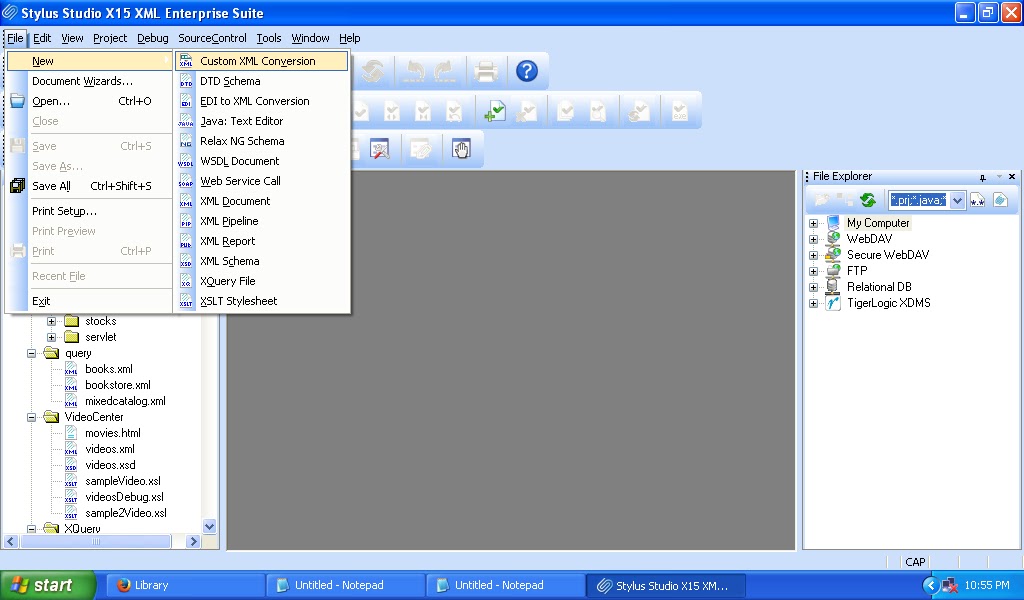
let me help you ease your stress of your file convertions, what do i mean? for every written job on any format or csv files you want to convert either to XML or PDF or any other format, i wanna introduce to you a Recognised Programme known as

Stylus Studio Enterprise Suite


Description:
Stylus Studio X15 XML Enterprise Suite Build 1910l Incl Patch -tsrh- [MUMBAI]


This is an advanced XML Integrated Development Environment (XML IDE) consisting of hundreds of powerful XML tools in one all-inclusive suite, and high-performance Java & .NET components to design data integration applications. Stylus Studio adds powerful new features, again pushing the innovation envelope that helped establish Stylus Studio as the premier XML IDE. Stylus Studio's best-in-class features for working with XML, XQuery, XML Pipeline, XSLT, XSL:FO, EDI, XML Schema/DTD, XPath, XML & Databases, XHTML, XML mapping, XML publishing, Web services set a new benchmark for XML productivity.

Stylus Studio® X15 XML Enterprise Suite Feature

XML Editors
Stylus Studio® X15 XML Enterprise Suite includes numerous synchronized, visual XML editing views, Sense:X (Intelligent XML Editing), Integrated XML Validator, XML differencing, and much more!

XQuery (XML Query) Tools
Stylus Studio® X15 XML Enterprise Suite is the first and only XML development tool to support visual XQuery editing, XQuery mapping, and XQuery debugging.

XSL/XSLT Tools
Stylus Studio® X15 XML Enterprise Suite provides comprehensive XSLT development support, including XSLT debugging, XSLT mapping, XSLT profiling, visual HTML-to-XSLT stylesheet design, XSL:FO, and much more!

EDI Tools
Electronic Data Interchange (EDI) integration tools for converting, mapping and deploying advanced XML data integration applications which invlove read/write access to legacy EDIFACT and X12 data sources.


XML Pipeline
XML Pipeline lets you model your entire XML application instead of just individual pieces ΓÇö use it to design, edit, debug and deploy advanced XML data service applications.

XML Publishing
Visually design beautiful XML reports for XML publishing applications using XSL:FO, XQuery and XSLT technologies to generate PDF or HTML output from any data source.

XML Schema Editor
Read about Stylus Studio® X15 XML Enterprise Suite's new support for visual XML Schema editing, validation, XSD documentation generation, and other XSD utilities.

XSL:FO Tools
Learn what XSL Formatting Objects (XSL:FO) is all about, and how to use XSL:FO tools to create advanced document layouts and formatting styles to render your XML documents.

Document Type Definition (DTD) Editor
Stylus Studio® X15 XML Enterprise Suite includes a visual DTD editor, integrated DTD validator, and various DTD generation utilities.

XPath Tools
Stylus Studio® X15 XML Enterprise Suite includes utilities for XPath 1.0/2.0, including XPath Evaluator, XPath Expression Generator, Sense:X for XPath (Intelligent XPath Editing), and much more!

Web Services Tools
Stylus Studio® X15 XML Enterprise Suite supports Web Service Development via a Web Service Call Composer, UDDI Registry Browser, and other tools that make it easy to find, test, and use Web services.

XML Mapping Tools
With Stylus Studio® X15 XML Enterprise Suite, you can map data in one format to another using visual drag-and-drop mappers. Stylus Studio®'s mappers include support for mapping to and from XML documents, Web service data, relational data, flat files, and many more.

Import/Export Utilities for any File, XML and Relational Data
Stylus Studio® X15 XML Enterprise Suite includes Convert to XML, a visual tool for extracting XML data from any file format including CSV, tab separated, binary data files, EDI, or any other flat format, as well as many other data import/export utilities for RDBMS, XML, and more!

Relational Database Connectivity Tools
If you're working with relational and XML data, our powerful database and XML tools are a must-have for database architects, database developers, and Database Administrators (DBA's).

Java and XML Tools
Build XML-enabled Java applications using Stylus Studio® X15 XML Enterprise Suite's JSP Editor, XML-Java debugger, and more.

HTML/XHTML and Web Design Tools
Easily design advanced XML-data driven Web sites with Stylus Studio® X15 XML Enterprise Suite's handy XML tools for Web Designers!

Microsoft and XML Tools
Use Stylus Studio® X15 XML Enterprise Suite to build XML-enabled Microsoft applications with MSXML, Microsoft .NET XML (System.XML), SQL Server 2000, and other XML-enabled products and APIs.

XSD Tools
XSD is a language for describing the structure and constraining the contents of XML documents. Stylus Studio supports XSD editing, conversion, validation, documentation generation and much more. Learn more about Stylus Studio's advanced support for XSD development here.

Document Type Definition (DTD) Tools
These DTD tutorials and examples illustrate Stylus Studio's powerful tools and utilities for working with document type definitions, including DTD editing, validation, conversion, and much more.

below is a little guide to register this software for an effective functioning

Install Notes:
1. Disable Internet Connection.
2. Install Stylus Studio X15 XML Enterprise Suite.
3. Completely exit the program.
4. Copy the file "crc_stx15_1910l.exe" from Patch folder to installation directory. [C:Program FilesStylus Studio X15 XML Enterprise Suitebin]
5. Run the patch as administrator and click on Patch, it should show Patched Successfully.
6. Donot exit the patcher, Run the program and register with the key generated in patcher.

downlad it here

Website: http://www.stylusstudio.com

Maybe you need futher directives of the usage of this program, Contact me ASAP


Positive Effect of Winzip Updater On Your Pc

2 comments
In This contremporay time, it's important that your PC drivers should
be updated correctly in time to
keep the PC devices working properly, otherwise the outdated drivers may
become a drag to the computer and even cause severe problems like computer
slow down, blue screen, hardware crash, missing drivers,

WinZip Driver Updater is
a powerful utility that makes the task of managing your PC's device driver
updates quickily and very easy to use! How, it instantly scans your PC
for out-of-date
drivers on a regular basis and even Locates and downloads device drivers
for you, Isn't that Awesome!!!
SUBSCRIBE WITH YOUR MAIL AND CONFIRM
TO GET MY FREE BROWSING


Not only this, it automatically creates a backup of your original driver
system before making any changes and makes the task of locating and
installing the correct up-to-date software and device drivers for your
system and its components easy.

If you feel why we even need a driver in a PC then you should know that
every hardware component connected to your PC uses a set of instructions
contained in a device driver file. Manufacturers periodically release
updated driver files that fix known bugs or improve a component's overall
performance.

Keeping track of these updates and ensuring that you have the latest
drivers for each component can be tedious and time-consuming. Moreover,
accidentally installing the wrong driver can lead to system issues and
device failure. So, to put an end to your worries WinZip Driver
Updater has been put to place to
manages device driver updates and even scan for required driver updates.

With a single click, WinZip Driver Updater will scan your system, take
stock of your existing device drivers, and evaluate which need to be
updated based on each manufacturer's latest releases.

What is the most interesting part of this whole exercise is that before
performing any updates, WinZip Driver Updater produces a summary of
proposed drivers for you to choose from, giving you complete control over
the changes made to your system.

Feel free To Now Click Here And Download Winzip Driver Updater PRO

* Important:
Subscribe Now and Confirm It To Get My Unlimited Free Browsing

Please Share If I have Helped You or leave a comment below.

What is Cloud Computing And its Uses?

0 comments
For many of us clouds still remain the fluffy white things that float
in the sky or the darker fluffy things that bring thunderstorms and
rain. Well, today there is more to clouds than being fluffy and to
float in the sky. Cloud computing has given us a new way to perceive
clouds. There was an era when we relied on portable drives, hardware
and pen drives to very large extent and how we used to almost have
stroke if we misplaced these precious data holders. Cloud computing
reduces the stroke rate that one might get on losing a portable
hardware. It is a service that one can subscribe to and get a network
storage space and computer resources.

Cloud computing is similar to your e-mail account which you can access
from any corner of the world as long as you are connected to the
internet. The only difference is that with cloud computing you can
choose from the information that is accessible within the cloud. The
essentials that you need to get information from cloud computing is an
internet connection on any device ranging from a personal computer to
a tablet. Just like your email is not housed on your device
physically, the information on cloud computing is also not housed on
your device physically.
The convenience that cloud computing brings to the users is immense.
To start with it's the best deal for upcoming businesses and start up
organizations. It helps these budding ventures to make the best out of
the limited resources have and give them a chance to stand up well
established organizations that have a stock of hardware and software.
It also serves well for people seeking to use it for their personal
work. With the number of devices that one person owns today it might
get a little messy to keep a track of the data one might have saved on
either the phone or the laptop.
Cloud computing helps one to cut through the clutter and becomes a
kind of data bank.
There are different types of clouds that can suffice you needs. There
is the Public, Private, Community and Hybrid cloud, each with its own
specifications so to cater to the needs of different people.

Public clouds are accessible to all the subscribers with an internet
connection and access to cloud space.
Private clouds are set up for specific groups or organizations.
Community clouds are set up between two or more organizations that
have similar cloud requirements. Lastly, hybrid clouds have the
qualities of two types of clouds at the least. The combinations depend
on requirements of the people or the organizations.
Cloud computing certainly is futuristic as long as you know that your
service provider has taken all the necessary precautions and safety
measures.
Many big and small businesses widely use cloud computing either
directly or indirectly because of its prominent advantages like
up-to-date software, reduction of costs, flexibility, etc. But it
involves some privacy concerns also, so cloud security is an evolving
sub-domain of computer securityand network security.

Comprehensive Technology Support For Printers And Softwares

2 comments

Printers have become an important part of our daily tasks. Along with
desktops, laptops, tablets they are the most commonly used electronic device. Printers are common in various households and businesses. These printers serve multiple purpose of use; they are used for printing photographs and documents. The technology of printers has changed and evolved so much that nowadays we have printers, which are cost effective, and energy effective.
These printers are used for gray-scale printing (black and white printing), for color printing. In addition, the user can give print command to the printers using wireless connections and wire line connections as well.
These printers are used in institutions like colleges, schools, offices, ngos, whether someone is a working professional, faculty, or a student these printers come in use for printing various documentation and projects. The use of printers often throughout the day one needs to make sure the printer shall be in pristine condition, good working condition. In order to make sure the same the users must keep these machines fine-tuned and maintained as specified by the manufacturer on regular basis.
Various technological problems can affect printer & it's effectiveness for daily use and optimal performance. Some of the common problems faced with using printers are paper jam, incorrectly aligned cartridges, setting up printing right preferences based on user requirements.


HP is a multinational brand name in selling electronic devices and machines, amongst them one of their most preferred products by the users are HP printers. These printers are in high demand worldwide. With changing trends in information and technology, the company has introduced technology that makes these printers easy to use, cost-effective and energy-efficient.
The HP LaserJet Pro P1606dn Printer is a marquee product made to suit the
requirements of the small business office. The users can use the printer with Ethernet networking easy HP ePrint mobile printing. The printer gives an automatic two-sided prints. The paper tray of the printer has room for massive 250 paper sheets and it has a 10-sheet priority input slot. In addition, the printer also has an automatic on off feature that makes it an energy-efficient printer. If you are looking to save paper then you can benefit from HP Smart Web Printing that helps reduce the wastage of paper and helps in arranging the content you want.
When facing a problem with printers it is advisable to take help from professionals who are qualified to offer help in maintenance and repair of the printers. Hence, if you are facing any technical problems with your HP printer then it is advisable to take help from professionals who have
ability to help and help you and they are qualified to offer you the help.
Similarly, the antivirus products are also widely used all over the world.
These products have their preference amongst both private household users
and businesses as well. Ever since internet has been introduced, it has globalized the world and communicating information and exchange of data has become faster. However, an increasing threat of cyber attacks via viruses, malware, spyware and other malicious programs is a big problem for computer users nowadays.
In such a situation, it is important to have an effective, efficient and robust antivirus program. There are various companies that are selling antivirus and cyber security solutions. Very few companies have managed to
come up on the top.


Symantec Norton antivirus is one such product that has immense preference all over the globe. Information and technology security products sold by this company are in high demand. The company is headquartered in America.
The headquarters are located in Mountain View, California. The performance and quality of their antivirus and other cyber security products has made them one of the most preferred and famous IT security company. Sometimes using this software can be a little difficult due to some technical problems. I don't mean to discourage you patronizing on other Company's product like Avast, Netquin and others. In order to make sure these technical problems are resolved successfully,
it is important to take help from authorized and certified professionals. In such cases reference to tech support businesses turns out to be a cost-effective and reliable solution.
Lets hear From You.

Essential Tips You Should know on Your Computer

0 comments

How to Lock Personal Computer with Just Single Click?
Instead of pressing"CTRL+ALT+DEL"or"Windows + L"keys to Lock Down your
computer you can create an icon on your Computer desktop, with the
help of this icon you can lock down your computer in single click. To
create the icon:
1- Right click on free space of desktop then hover your cursor on NEW
and then select SHORTCUT
2- A window/Dialogue Box named: Create Shortcut will appear on your
computer screen
3- Now type given phrase in the blank space of dialogue box
Rundll 32 user32 dll, Lock Work Station And Press Next.
4- As soon as you will press Next Button, a new window will appear and
here you will see "Type a name for this shortcut". Here you can have a
name for this short-cut of your choice, I.e. Lock Computer or Log off
etc.
5- Now press Finish and you will have a Short-cut icon on your desktop.
How to see your most important file on top of the other files in
Windows Explorer?
If you want to see your most important file in any folder or Windows
Explorer on top of the other files, so that it will be convenient and
time saving for you. For that you just need to follow a simple trick:
1 - Go to the folder where you want your file should be top of the other files
2 - Right click any free space in folder and arrange these files "Sort by Type"
3 - Now click on any file of your choice then press F2 to rename the
file and at the start of the name of file insert an Underscore " _"
I.e. New Document.docx to _New Document.docx.
How to Shut Down Computer Friskily?
When you shut down your computer or laptop, many programs remain in
Running Process and they are not completely closed. That's why
Computers and Laptop take too much time to shut down. To resolve this
problem I am going to share a very useful tip with you.
1- Open Notepad
2- Write these three words "Shutdown inn text" in notepad and save it
as Shutdown.reg
3- Now go to the location where you have saved this file and double
click on this file.
4- Import the file
(Your computer will shut down faster than before)

How to Create a File or Folder without any Name?
1- First of all select the file or folder which you want to remove its name.
2- Press F2, then Press and Hold ALT Key and then press 0160. Press Enter
3- Your file or folder will now be un-named..
How to clean program files with Run menu?
When you write any command in Run menu, few of past commands remain
save in Run Menu drop down list. Furthermore the lists of programs
which are currently running also remain in Run Menu. If you want to
remove these lists from Run Menu then use this small yet powerful tip.
Open Run and type "REGEDIT"
In Registry Editor select this Registry Key "HKEY_CURRENT_USER" from
left side panel.
Now go to "Software > Microsoft > Windows > CurrentVersion > Explorer > RUN MRU"
In RUN MRU Folder every last used information are saved. After
clicking on RUN MRU folder there will be shown some values on right
hand side window. Except "Default" file delete every file from this
folder.
In this step restart your computer, now when you will see your RUN
Menu drop down list, it will be emptied.
How to hide shared folders from Network?
To hide shared folders from your network location, simply add a "$"
sign in the end of every folder name. By doing this your shared
folders will be hidden from all users. Except those who know the
correct location of that folder.
How to change the ownership of Windows?
If in case while installing fresh windows on your system, you have
unconsciously entered some wrong information regarding ownership, you
do not need to worry about it. Because you can alter these information
anytime, you just need to have a bit knowledge about Windows Registry.
Go to Registry Editor "Run > Regedit" and search the Registry Key.
HKEY_LOCAL_MACHINE > Software > Microsoft >WindowsNT > Current > Version
From right side panel find a file named "Owner" double click this file
and change the values as per your need.
Close the registry editor and restart your computer. Done

How to find properties of any file or folder quickly?
If you want to know the properties of any file or folder quickly then
select the file and press "ALT + Enter", the properties will rapidly
be shown. It's a better and quick to get property information then the
mouse.
Stick around my blog for more update on next article or you can
quickly subscribe for free using you mail address below.

I appreciate your own contribution for others to benefit.


Thanks.

Solutions To Data Insecurity In A Global Village

0 comments

It is obvious that data security has always been a cause of concern
for users across the
globe. From installing anti-virus programs to password protecting your
computer devices, users don't hesitate to walk the extra mile when it comes
to safeguarding their data. After all, if the data falls into the wrong
hands it could lead to disastrous sequences, couldn't it? The Universal
Serial Bus or USB as it is popularly known, is one of the most commonly
used portable storage options for data. However, did you know that your
data is exposed to major security threats when you are storing it on USB
drives?

While your Facebook account, computer access, etc. can be password
protected; doing the same with your USB drive is quite a daunting task. You
cannot password protect an entire USB drive easily but you can surely
achieve a fair enough level of protection through a host of other
techniques and applications.

For those of you who don't believe us, here are a few suggestions on how to
password protect the data in your USB drive.
RECOMMENDED: How I Password Protect Folders on Windows
Encryption: This is a unique USB protection method that allows you to
safeguard all the data in an encrypted disk. Once you use implement the
software it creates an encrypted disk within your USB storage device. All
the data that you choose to store on this encrypted disk is completely
protected even when your USB drive is lost or stolen. While there are many
software programs available in the market that provide encryption facility
for USB drives, implementing them is going to take quite some time and
money.
SafeHouse Explorer creates secure, strongly encrypted volumes that can
secure huge amounts of data on your main system, portable devices, and
even USB drives and other storage media yet remain hidden until
accessed with a password. It's portable freeware that can run without
being installed, even from a USB drive or the Internet, giving you
access to your protected files.

Download SafeHouse Now

If encryption you think is an expensive option for you, the other way out is to
individually password-protect all the data in your USB drive. We are all
familiar with the manual techniques to password protect word-files, excel
sheets and other documents, aren't we? Even on your USB stick, you can
carefully sort out the important files and accordingly work on creating
passwords to protect them using these techniques. For those who don't know
how to password-protect their documents, you can always rely on internet
tutorials and articles or even use Google Search Engine to satisfy your desire which enables you understand
the correct way of doing it.

*Using apps

Markets are flooded with several apps that specialize in locking the USB
flash drive without even accessing a computer. These apps are extremely
useful and easily available through your local search engine. All you need
to do is download the apps and start using them.
I Recommend You
Download SafeHouse Now


I HIGHLY RECOMMENDED: How I Password Protect Folders on Windows

Please Share This Article To Others.
Reliable Web Hosting in Nigeria by DomainKing.NG