Today, was a great and happy day for me, having find a possible means to blog with my phone once more. The new blogger interface may be difficult for some bloggers to understand and use effectively, it signify that google is taking us to another level of technology and I appriciate it.Don't worry much, you need to revert back to the old blogger interface for effective blogging. This old interface, enables you to do the following
A. Edit
B. Post
C. Adjust your settings
D. Add more gadgets to your blog
E. Configure your HTML gadgets
F. Finally, edit your template.
As for me I make good use of my Nokia 2680 slide phone to blog most atimes. Once your phone can harbour applications, perform some certain task like==> renaming and unziping of files, you are good to blog with your phone.
You can also become and create a blog like mine by signing up here
www.blogger.com
Follow suit the instructions given to you to choose a template of your choice for a start, and start to publish your post.
Hope this satisfy the newbies blogger? Good lets get into the main business.
HOW I REVERTED BACK TO OLD BLOGGER INTERFACE WITH MY PHONE
1. Logout your gmail account on any browser on your phone.
2. Login again with your UCWEB browser Version 8.0, enter your blog url into the address bar, navigate or scroll to the top right of your blog and hit "SIGN IN"
3. After that, you will see your profile, just by your right view, click on the star (*) icon as shown below
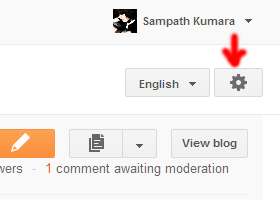 when it loads you will see options like this

click on "Old Blogger" to go back to the old blogger interface, the above screenshot satisfy you.
After that, exit your browser.
4. Now open your OPERA 4.2 OR 5.2 as the case may be,login again or just move upwards at the top right hand side of your blog, click on "NEW POST" and start typing in your post into the box provided with your phone rightaway.
HAPPY BLOGGING!!!
You can as well share this post outside there and feel free to lay your comments below this post.
My Regards:
Marx Chiedoziem[JAKA]
A. Edit
B. Post
C. Adjust your settings
D. Add more gadgets to your blog
E. Configure your HTML gadgets
F. Finally, edit your template.
As for me I make good use of my Nokia 2680 slide phone to blog most atimes. Once your phone can harbour applications, perform some certain task like==> renaming and unziping of files, you are good to blog with your phone.
You can also become and create a blog like mine by signing up here
www.blogger.com
Follow suit the instructions given to you to choose a template of your choice for a start, and start to publish your post.
Hope this satisfy the newbies blogger? Good lets get into the main business.
HOW I REVERTED BACK TO OLD BLOGGER INTERFACE WITH MY PHONE
1. Logout your gmail account on any browser on your phone.
2. Login again with your UCWEB browser Version 8.0, enter your blog url into the address bar, navigate or scroll to the top right of your blog and hit "SIGN IN"
3. After that, you will see your profile, just by your right view, click on the star (*) icon as shown below
when it loads you will see options like thisclick on "Old Blogger" to go back to the old blogger interface, the above screenshot satisfy you.
After that, exit your browser.
4. Now open your OPERA 4.2 OR 5.2 as the case may be,login again or just move upwards at the top right hand side of your blog, click on "NEW POST" and start typing in your post into the box provided with your phone rightaway.
HAPPY BLOGGING!!!
You can as well share this post outside there and feel free to lay your comments below this post.
My Regards:
Marx Chiedoziem[JAKA]